 Skip to main content

Option B: Giving External Reviewers Access to Scholarship Materials Online
Instructions to Candidate
- Upload your CV, research narrative, and scholarship materials to the dossier site.
- Make a copy of the site following the instructions below:
- Go to the Blackboard Course Generator at https://bbhelper.wm.edu.
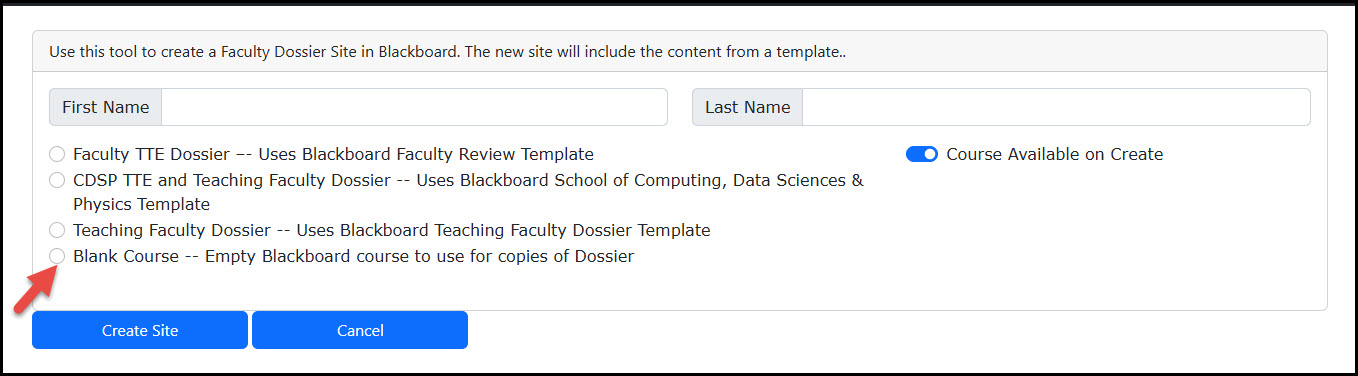 Select under the Dossier menu listing- Blank Course.
 - Once the course has been created, you will be able to find it in blackboard under the courses tab, with the following naming convention (Last Name, First Name Dossier Copy)
- Open the blank Dossier copy and choose to Add Content to the course.
- In the listing choose Copy Content.
- Locate the Original Dossier site in this listing and select the course.
- Click on Start Copy.
Instructions to the Candidate after the copy has been created.
- Once this process has been completed, you will need to add the Dossier Manager to the copy site. You can follow the same instructions at Adding the Dossier Manager to the Dossier Site.
- Once the Dossier Manager has added the redacted letters to the original site and you have had a chance to review them, upload the rest of your materials, including your teaching and service/government documents.
Once the Dossier Manager has added the redacted letters to the original site and you have had a chance to review them, upload the rest of your materials, including your teaching and service/government documents. - Once the Dossier Manager has informed you that the site is ready for review, the Chair/Program Director will meet with you to review the site and prepare the full Table of Contents of the dossier site. You and the Chair/Program Director will need to sign off on the Table of Contents.
- Once the Dossier Manager has uploaded the signed Table of Contents, you will need to make a final export package of the site for your records. *please note that if you want to see the materials in the folder as they originally appeared in your blackboard ultra course, you will need to create a blank Dossier site and import the zip file to your course.