 Skip to main content

Poll Everywhere
Student Response System
Poll Everywhere (PollEv) is a web-based student response system (SRS) that works on any Internet enabled device. Instructors can choose from a variety of question types to display via a mobile-friendly website and ask students to engage with the content by responding to the questions on their devices. Additionally, instructors can integrate polls (questions) in any existing presentations built in PowerPoint, Keynote, or Google Slides.
Student responses can be aggregated in real time and/or reported to Blackboard Grade Center. PollEv creates pathways for instructors and students to interact with each other on an intuitive and user-friendly platform.
Using PollEv
For Students
Students can create an account using their William & Mary credentials. Upon entering a W&M student email address, users will be prompted to sign in via Single-Sign On (SSO).
After establishing an account, students can view and track responses as well as make polls of their own. Instructors can create groups for each class and utilize a wide variety of questions types.
PollEv Student GuidePOLL EVERYWHERE BLOG
For Faculty
Using PollEv in your Course: Instructors who wish to use PollEv should include relevant information about the SRS in their syllabus. This information should include a general description of how the SRS will be used.
The account creation site can be linked in the syllabus or Blackboard announcement to direct new PollEv students to the appropriate site for account creation. Please note that students must use their W&M credentials when creating the account.
Instructor accounts must be associated with the W&M account in order to access full instructor privileges.
Linking PollEv with your Blackboard Courses: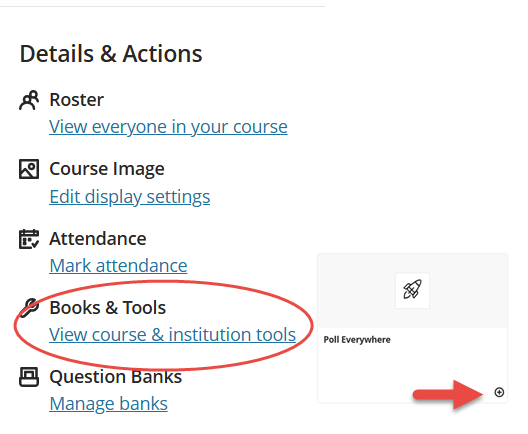
- To connect PollEv into your Blackboard course, go to the Details and Action panel and select Books & Course Tools.
- If you do not see PollEv in the listing, click on more tools.
- Select the Poll Everywhere tool by clicking on the plus icon to add to your course.
- Sign-in with your William & Mary credentials and select the course you would like to link. PollEv will create a group in your account with a roster pulled from Blackboard.
- Once this link is made, instructors can optionally report poll results to grade center to be included in the student's overall grade.
Instructions for Blackboard Ultra LTI Advantage Usage Guide for Educators.
Technical Questions
For concerns about logging-in to PollEv, contact the Technology Support Center at 757-221-4357 (HELP) or [[support]].