 Skip to main content

Blackboard Ultra Transition
William & Mary is entering the final phase of its transition from Blackboard Original Courses to Ultra Courses. Academic courses are currently taking full advantage of Ultra, and now non-academic courses will have the opportunity to leverage the full Ultra experience.
Anthology (Blackboard) has announced the retirement for Blackboard Original Courses in December 2026. To ensure continuity of operations, all Non-academic Original courses must be migrated by May 19, 2026.
Timeline
| Date | Timeline Action |
|---|---|
| Fall 2025 - Spring 2026 | Notification sent to campus community to transition non-academic courses from Original to Ultra experience. IT will host office hours and send recommendations for transitioning. |
| May 19, 2026 | Deadline for Non-Academic courses to be transitioned from Original to Ultra. All non-Academic Original courses will be deleted after this date. |
| Summer 2026 - Fall 2026 | Communication regarding Original Academic courses taught pre-Fall 2024 will be announced. |
Impacted Courses
The following types of courses will need to be migrated by the May 19, 2026 deadline, to include:
- Original Non-Academic Courses
- Original Dossier Copied Courses
- Original Template Courses
Please note: Past Original Academic Courses (taught pre-Fall 2024) are not impacted by the May 2026 deadline. IT will provide further communication about this process at a later date. If you would like to be proactive in meeting the future deadline, please follow the directions provided for transitioning your content.
Transition Options
Transitioning your Original Non-academic course by the deadline will ensure smooth operation in the new Ultra format. The options you have for transitioning include:
- Transition from Original to Ultra in Blackboard
- Migrate to an alternative platform
- Microsoft Teams
- SharePoint Sites
- OneDrive
- Google Workspace Apps
- Panopto or Microsoft Stream for media storage
- Archiving Content for Safekeeping
Note: OneDrive is recommended for storing FERPA-protected data.
If you no longer wish to use Blackboard for your content delivery, no action is needed as we will delete your original non-academic course after the deadline. You may migrate to one of the alternatives to Blackboard based on your use case. Most notably, we recommend leveraging Microsoft Teams or SharePoint to deliver content.
Transition from Original to Ultra in Blackboard
If you would like to continue using Blackboard for your course content delivery, follow the steps below:
- Create a new Ultra Non-Academic Ultra Course
- Navigate to your new Non-Academic Ultra Course after creation.
- From the course dashboard, select Add Content, then select Copy Content.
- From the search bar, enter and select the Non-academic Original course to bring over.
- Click Start Copy.
HOW TO COPY CONTENT FROM ORIGINAL TO ULTRA COURSES
Migrate to an Alternative Platform
If you would like to no longer use Blackboard and would like to export content to migrate to an alternative platform, follow the steps below:
- Navigate to the Tools section.
- Select Content Collection.
- Click on My Courses.
- Locate and select the course folder containing the files you wish to download.
- Check the boxes next to the files you want to download.
- Click the Download button.
For additional resources visit information on the Content Collection.
Alternative platforms
- Microsoft Teams
- SharePoint Sites
- OneDrive
- Google Workspace Apps
- Panopto or Microsoft Stream for media storage
Archiving Content for Safekeeping
If you would like to only archive your content for safekeeping and not to import into Blackboard or migrate to an alternative platform, follow the steps below:
- Export or Archive Original Courses
- Save to your local computer or OneDrive
⚠️ Do Not unzip Blackboard archive or export files. These files must remain zipped in order to be reuploaded to Blackboard.
Frequently Asked Questions
Why do we need to migrate?This marks the final phase of W&M’s transition to Ultra. As previously communicated, we intended to provide a timeline for the required migration of all courses. In light of the ERP transition to Workday, we have determined that the end of May will serve as our deadline for completion. |
||||
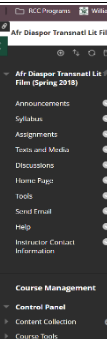
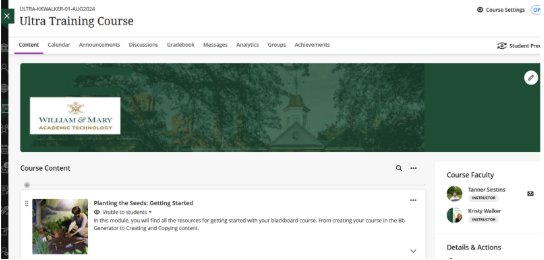
How can I tell which type of course I have?View a side-by-side comparison of Original and Ultra courses to determine which course type you have.
|
||||
What resources are available?Please visit Blackboard Ultra Resources to review our how-to resources. |
||||
Do I need to transition?No – you do not need to transition Original Non-academics courses if you no longer want to use it. We will delete all Original Non-academic courses after the deadline, so if you no longer need the course and do not need to transition, no action is needed. If you want to keep any of the content, you may want to archive content for your own record keeping. |
Need more support?
Be sure to check the IT Event Calendar regularly for scheduled Non-Academic Course Office Hours, where you can get support and guidance throughout your transition to Ultra Courses.