 Skip to main content

Delegation in Workday
Summary
Delegation enables users to give another person the ability to initiate business processes on their behalf or take actions on their My Tasks items.
Full Description
Delegation enables users to give another person the ability to initiate business processes on their behalf or take actions on their My Tasks items. Users can set a start and end date to cover a specific period or they can delegate on an ad hoc basis.
Delegation is different from reassigning a task. Reassignment permanently moves responsibility for a task from one person to another. Delegation doesn't remove responsibility (ownership) for the task from the original task owner but rather enables a user to perform tasks on behalf of the original task owner. It is meant to be temporary or for a short term. If you believe a task should be permanently reassigned, please submit a Workday security request so we can look at systems roles with you.
Business Benefits
Delegation enables users to share responsibility of their business processes among peers, subordinates, and superiors. Delegation ensures that tasks don't get held up when a user is unavailable.
Use Cases
- Delegate Business Process Tasks (Do My Tasks On My Behalf): A manager on vacation can delegate My Tasks items, like PTO request approval, to their manager who can then approve any incoming PTO requests.
- Delegate Business Process Initiation (Start On My Behalf): A user on a business trip can set a delegation period to have a delegate create expense reports on their behalf while they are out of the office.
- Delegate a single task: A user can delegate a coworker to approve a specific expense report on their behalf.
A comprehensive job aid is accessible on the Launch website, providing detailed instructions for managing delegations.
Delegating time approval
Time approval is among the most frequently delegated tasks. Please refer to the job aid for guidance on establishing a delegation; when prompted by the Business Process dropdown, select “Enter Time.”
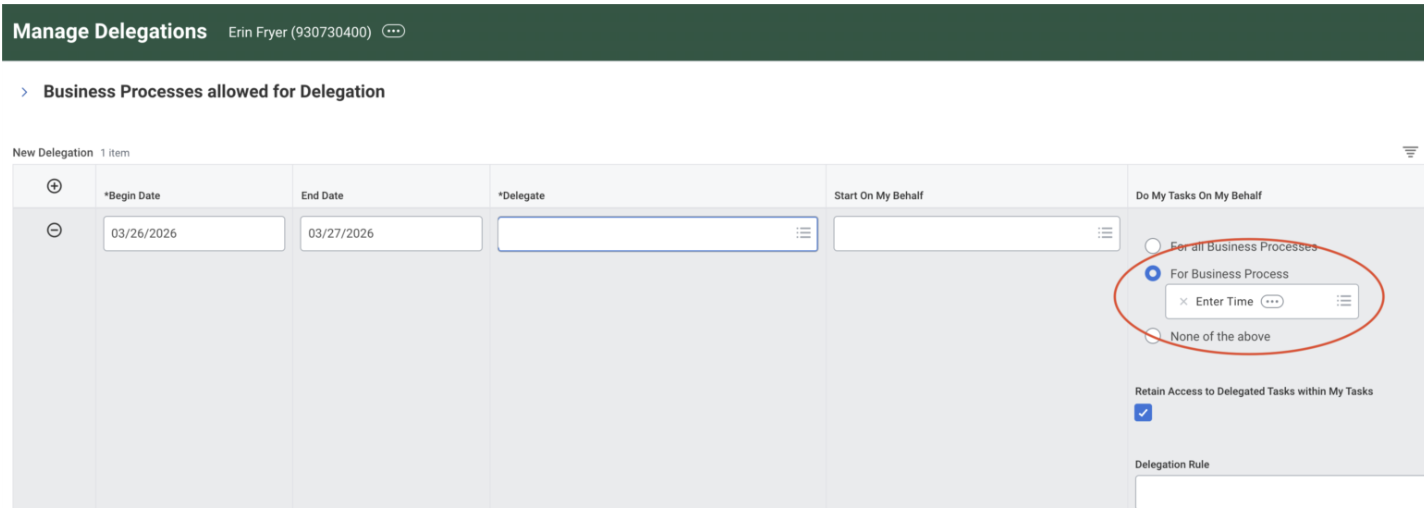
The delegation request will be routed to your supervisor for approval prior to activation. Upon supervisor approval, your designated delegate will have the authority to approve time entries on your behalf.