 Skip to main content

What's New: Blackboard Gradebook Grid View
Summary
Beginning on August 10th, Blackboard at William & Mary will have a restructured gradebook experience for the Grid View, providing an improved workflow for the instructor grading experience.
Full Description
Beginning on August 10th, Blackboard at William & Mary will have a restructured gradebook experience for the Grid View, providing an improved workflow for the instructor grading experience. View the short video on Gradebook Navigation and Layout (1:46).
What’s Changing in Gradebook Grid View?
- Grade Details panel always stays open. The Grade Details panel now opens alongside the gradebook when you click on any cell. The Assessment Details panel does the same for column-level information.
- To Do Panel replaces the Overview tab.
- Accommodations appear in Grade Details panel.
- Additional control over student display and sorting features.
- Grade entry that flows using edit mode.
What Stays the Same?
Your grades, grade calculations, and course settings are not changing, only the workflow and interface for grid view has been restructured. List view of gradable items has not changed, and you can toggle between the two views by clicking on the icons at the top menu heading.
| Previous View | Restructured View |
|---|---|
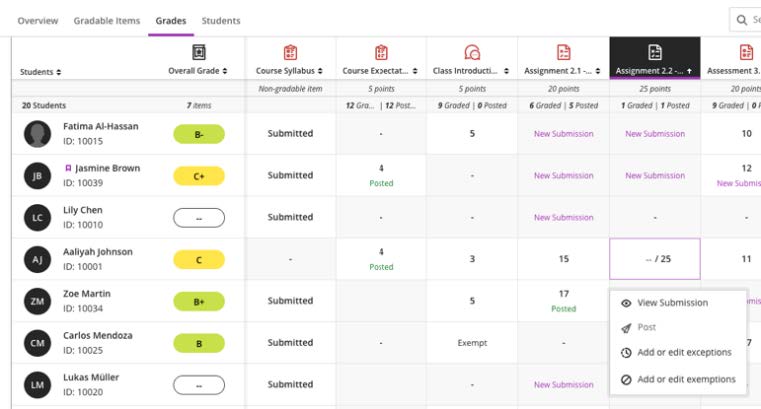 |
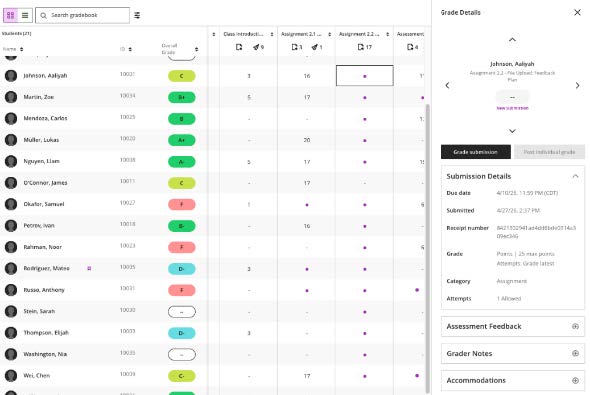 |
For more information and demonstrations about the Gradebook workflow, please visit the Blackboard Community Gradebook Resource Hub.