


Duplex Printing
Duplex printing refers to printing on both sides of paper. This saves paper and makes large prints more manageable, but does not save you printing costs. For instance, a 30 page print will print duplex on each side of 15 pages of paper, but cost $0.07 per SIDE to print (or 30 x 0.07, the same as printing 30 single-sided pages).
Most public lab printers are capable of duplex printing, but to save printer wear and tear, it is not generally enabled by default.
Setting a Particular Print for Duplex:
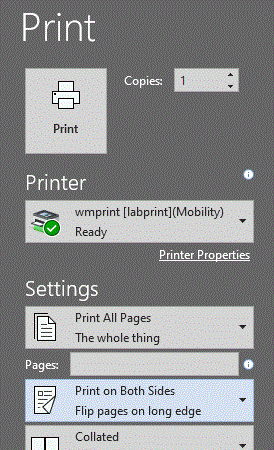
A quick way to set for duplex is to set it just before you print, from within whatever application you are using. As an example, in Microsoft Word O365, before clicking the "Print" button, set it to "Print on Both Sides":
Questions?
Contact the Technology Support Center (TSC)
757-221-4357 (HELP) | [[support]] | Monday - Friday, 8:00 am - 5:00 pm