Skip to main content

How to Register
We know registration can be a tricky process to navigate. So whether you're a battle-scarred registration whiz, a new student getting ready to register for the first time, a non-degree seeking student, or a senior citizen looking to take a course, we're here to help.
With a little prep work, you'll be prepared to register using PATH. Don't worry. We'll get you through it!
Undergraduate Registration
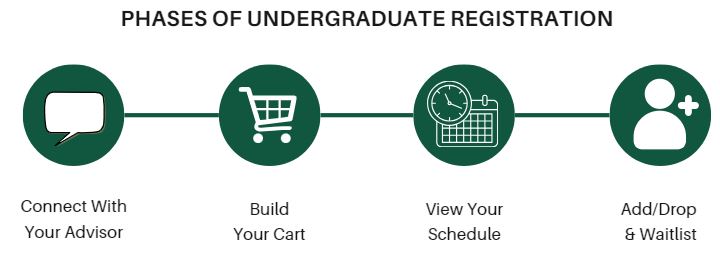
This section provides an overview of undergraduate registration for the fall and spring terms from cart-building through add/drop. Interested in how PATH processes registration? Learn more here.
Class Search & Registration Restrictions
Registration starts with searching for your courses. Learn how to navigate the class search and understand common registration restrictions that departments place on their courses.
Build Your Cart & Set Registration Priorities
Are you looking for more detailed information about building your registration cart and setting registration priorities for your courses? This section includes a deeper dive with instructions, videos, tips, and tricks.
Carts & Registration Priorities
Add, Drop, Withdraw & Waitlist
After schedules are released to students, registration happens in real-time. Learn how to add, drop, or withdraw from courses through written instructions and video demos. Interested in joining a course waitlist? Learn how waitlisting works at W&M.
Post-Registration
You've registered! What's next? Learn how to view your schedule in Banner Self-Service or PATH and find out how to order textbooks.